
One Restaurant Shoot, a Week of Short Videos and Website Assets
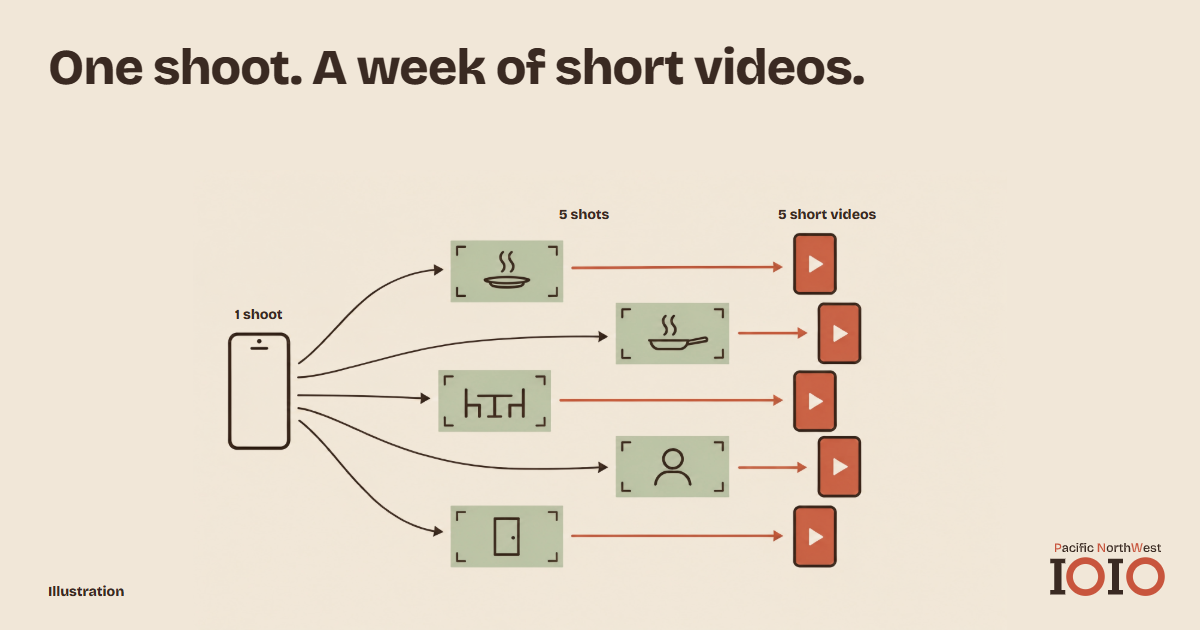
Filming a little every day is hard when you are also running a kitchen. One planned session can give you most of a week's posts, plus the photos your website needs. Decide what you are filming before you pick up the phone, and decide where each clip will end up.
Five kinds of shots, one quiet hour
Choose a slow hour, ideally before service, and plate the dishes you actually want people to order. Then film five things.
Dishes up close. Three or four plates, each from above and from the side. If steam rises or a sauce gets poured, keep it rolling.
The making. A pan on the flame, a knife, a plate going across the pass. Short clips of a few seconds are easier to edit than one long take.
The room. Tables set, afternoon light, the corner where regulars sit.
The people. Hands, aprons, a cook plating. Show a face only when that person has agreed.
The front door. The entrance and the view a first-time guest sees from the street.
You do not need fancy equipment. A phone is enough, and YouTube's Shorts guide describes the same basic route: record new clips or pick existing videos and photos from your camera roll, then trim them and add text.
Name the files before you leave the kitchen
Raw footage turns into a mess within a week. Create one folder for the shoot, with the date in its name, and rename each clip as soon as you finish: `ramen-top-down`, `pass-plating`, `front-door`. Whoever edits later, whether that is you, a staff member or an agency, should be able to find a shot without scrolling through hundreds of thumbnails.
Turn the shoot into five short videos
Five is a comfortable number for a week. Each video needs one idea, so you could use one signature dish, one how-it-is-made, one look at the room, one person at work and one "come find us" clip that ends at your front door. Cut each to the moment that matters and add a line of text. Let your best-looking dish lead.
Spread the posts over the week rather than posting all five at once. A steady rhythm is easier to keep going than one burst of effort, and a Monday to Friday plan means you never have to decide what to post that day. If a clip comes out flat, drop it. Four good videos beat five that you are not proud of.
When a dish is new or the footage is thin
A new special may be ready to sell before you have time to film it. We make AI-generated promotional videos for restaurants, working from your existing photos and clips, with captions and an AI voice if you want one.
Give every clip somewhere to land
A short video should lead somewhere. Point it at the page where a guest can act, whether that is the menu, the booking link or the directions. If you have not yet checked that path from a phone, read From Your Restaurant's Mobile Menu to a Reservation or Order first.
| Shot | Short video use | Website use |
|---|---|---|
| Dishes up close | Signature dish clip | Menu page photos |
| The making | Behind-the-scenes clip | About page |
| The room | Atmosphere clip | Homepage banner |
| The people | Meet-the-team clip | About page |
| The front door | "Come find us" clip | Directions and contact page |
Check every caption against your menu
Before anything goes public, read each caption and on-screen line against today's menu. Dish names, prices and the days a dish is served all need to match. A clip of a dish you stopped making last month sends guests to a table with nothing to order. Check the background too: a chalkboard with last season's specials or a menu board in the corner of a shot can contradict your caption.
Keep the original files after you edit. If a dish changes next month, you can cut a fresh version from the same footage instead of booking another shoot.
Make sure every clip shows what guests will really find. Label AI-generated clips clearly, and check that they do not change how your dishes or dining room look. Never present generated scenes as a real guest experience.
Share the work
Name one person who posts and one who checks the captions, even if that is the same owner wearing two hats. Write down which clip goes out on which day. Keep the shoot folder, so that next month's session can add to it rather than start again.
This is the order of work we would suggest for any local restaurant: decide who you want to reach first, then build the path from search to table. Short video is one step on that path, not a replacement for the others.
Tell us what you want to promote, and we will show you where AI video fits.
Get your free digital audit Specialized digital marketing agency targeting local SMEs in the PNW region (WA/OR).